Mac-native Chess Database + Repertoire Builder

AIChessGM helps you build a real opening repertoire from your own games. Create a transposition-aware Opening Tree, add engine evaluations only where it matters, use the Features pane to turn positions and games into structured coaching, and train your lines with structured practice tools.

AI features are optional. AIChessGM is first and foremost a modern macOS chess database and repertoire system.

Try AIChessGM Free for 30 Days
macOS 14+ β€’ Apple Silicon
AIChessGM 1.000 is available now. $100 USD once for AIChessGM 1.x, including all 1.x updates, for up to two Macs. New eligible commercial installations receive a 30-day trial. Existing preview users keep their current trial expiry. Read the release announcement.

Powerful Features for Serious Chess Players

Everything you need to organize, analyze, and improve your chess game

🧭

Game Flow Mode – Visualize the Game’s Strategy

See the full journey of every piece from any position. Understand maneuvering, coordination, and strategic plans at a glance.

πŸ“š

Database Management

Create, organize, and search large collections of chess games. Import from PGN, export to various formats, and manage your game library with powerful search and filtering tools.

β™Ÿ

Engine Analysis

Integrate UCI chess engines like Stockfish for position evaluation. Configure threads, hash size, and MultiPV to get detailed analysis with principal variations and depth metrics.

πŸ“–

Opening Books

Use Polyglot (.bin) and ChessBase (.ctg) books for reference and book-guided play.

🌳

Opening Tree (Repertoire Builder)

Build a repertoire from your databases. Transposition-aware stats, engine eval, backsolved eval, comments, and one-click training.

🎯

Training Mode

Practice with multiple training agents including engine analysis, game lines, opening books, and mistake training. Track your progress and identify areas for improvement.

🧩

Rules Platform (Preview)

Start from built-in starter bundles, run dry-run previews before enable actions, and automate your review workflow with targeted rules.

πŸ€–

AI Chat Assistant

Optional OpenAI-powered assistant for contextual help. Get move explanations, position descriptions, and game annotations powered by artificial intelligence.

πŸ“

AI Scoresheet Recognition

Transcribe handwritten scoresheets with AI vision and repair unclear moves in context. Use a dedicated Scoresheet Recognition Model separate from diagram recognition.

πŸ“Š

Features Pane β€” Position Coaching + Game Patterns

Turn a single board or a full game into structured coaching. See position state, prophylaxis, current motifs, recurring themes, swings, and motif timelines in one sellable analysis view.

πŸ–₯

Customizable Workspace

Dockable panes with flexible layouts. Save named layouts for different tasks and switch between them instantly. Auto-load your favorite layout on startup.

Your Repertoire Loop

A practical workflow from game import to repeatable training

1. Import games (yours + model games)
2. Convert to Opening Tree (.otb)
3. Smart Analyze + Backsolve
4. Train your lines (Tree / Book vs Book / Mistake Training)

Rules Platform (Preview)

Use starter bundles out of the box now, then grow into AI-authored and shared rule packs.

πŸš€

Top 20 Starter Set

Load high-impact rules grouped into bundles like Beginner Improvement, Tactics Focus, and Repertoire Discipline.

πŸ›‘οΈ

Dry-Run Safety

Before enabling bundles, AIChessGM previews projected matches, top hit rules, and unavailable-field warnings.

πŸ“¦

Portable Setup

Export/import your Rules settings snapshot so orientation and auto-load behavior move cleanly between installs.

🌐

Community Rules (Planned)

Website upload/download for favorite rule packs and AI-assisted rule authoring are the next direction.

Open Rules Hub Read Rules Platform Guide

Library Ask AI Schema Publish Guide

See AIChessGM in Action

From position coaching to repertoire building, AIChessGM turns raw chess data into practical study workflows.
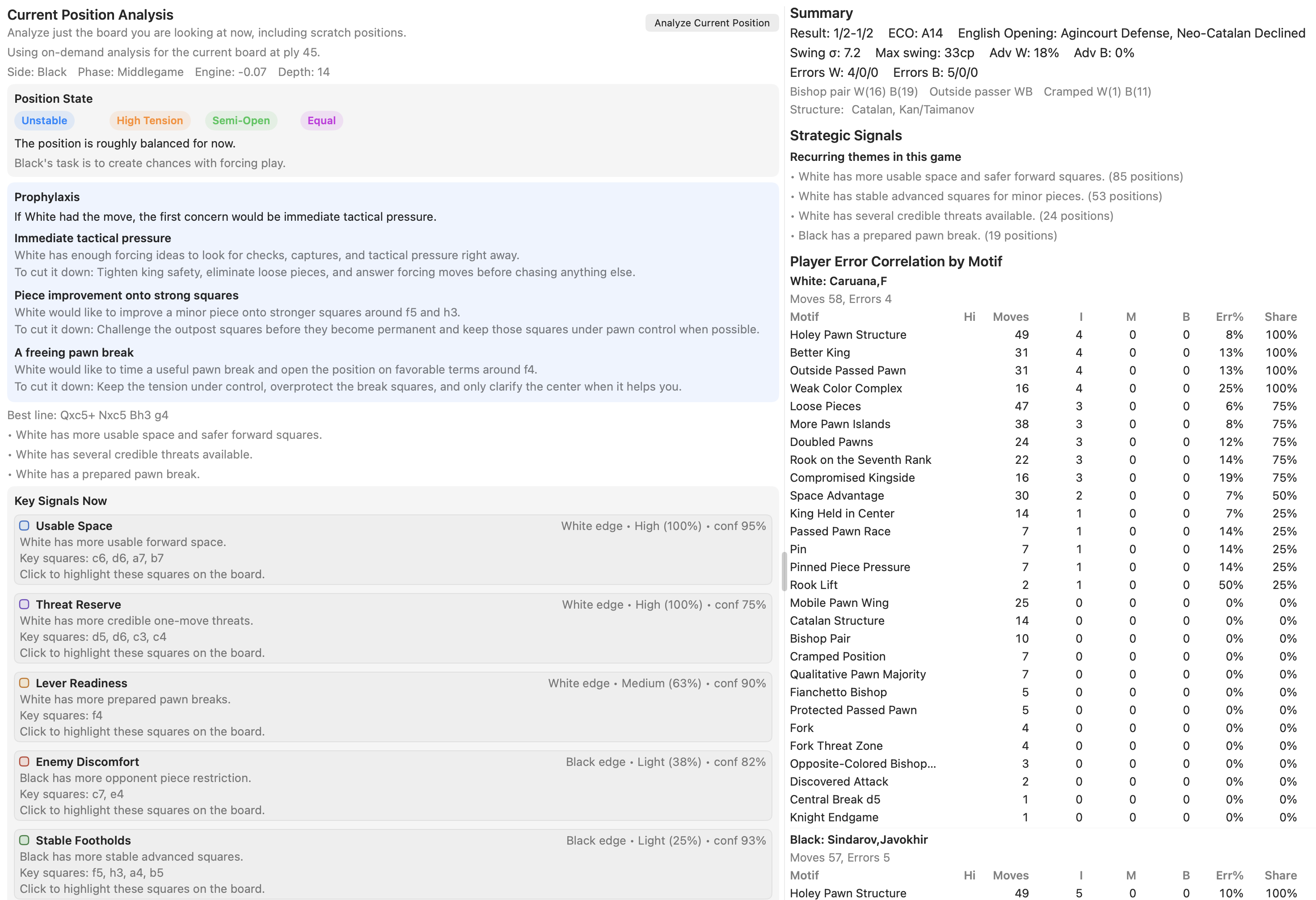
Features pane showing current position coaching on the left and game pattern analysis on the right

Features Pane with current-position coaching on the left and game-wide pattern analysis on the right, including state tags, prophylaxis, strategic signals, and motif-error correlation.
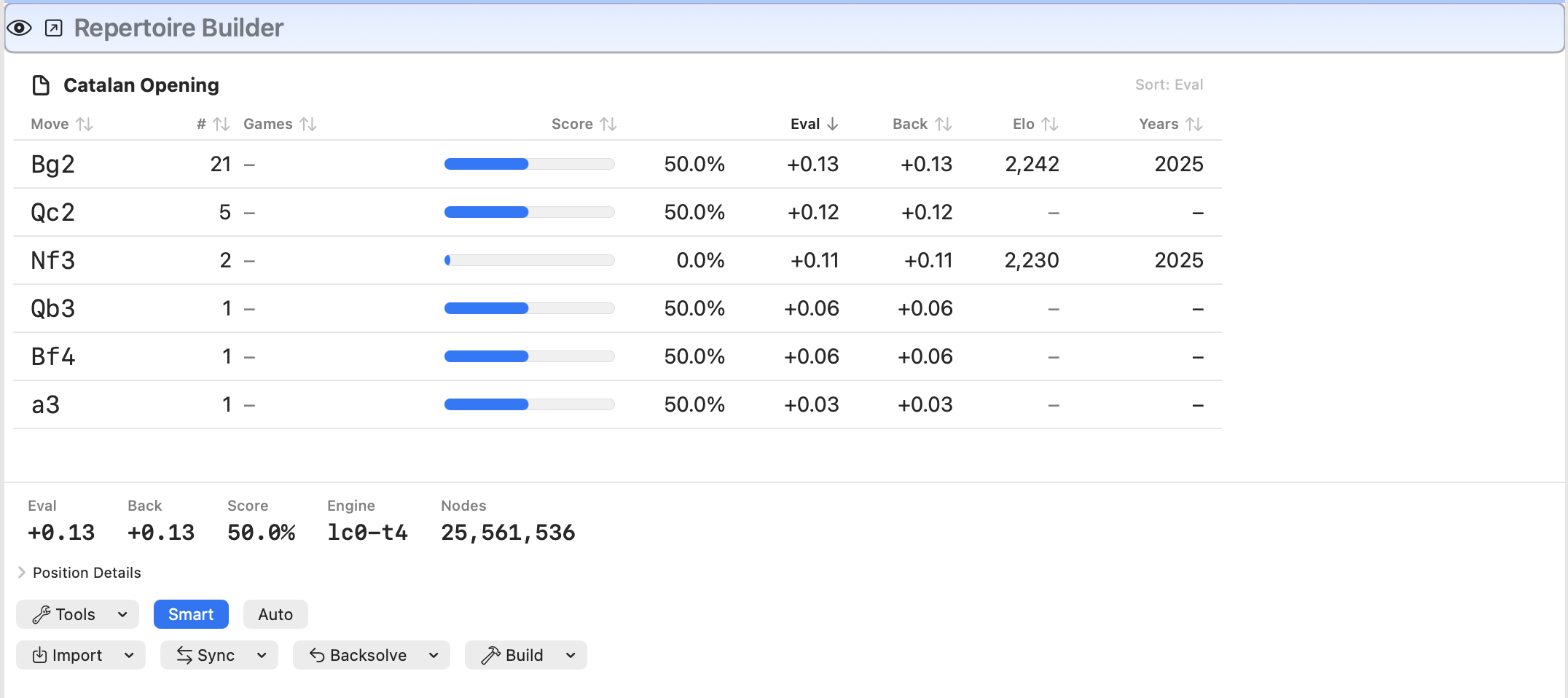
Repertoire Builder pane showing move stats, engine eval, and backsolved eval

Repertoire Builder with transposition-aware move stats, Eval + Back columns, and Smart/Backsolve workflow controls.
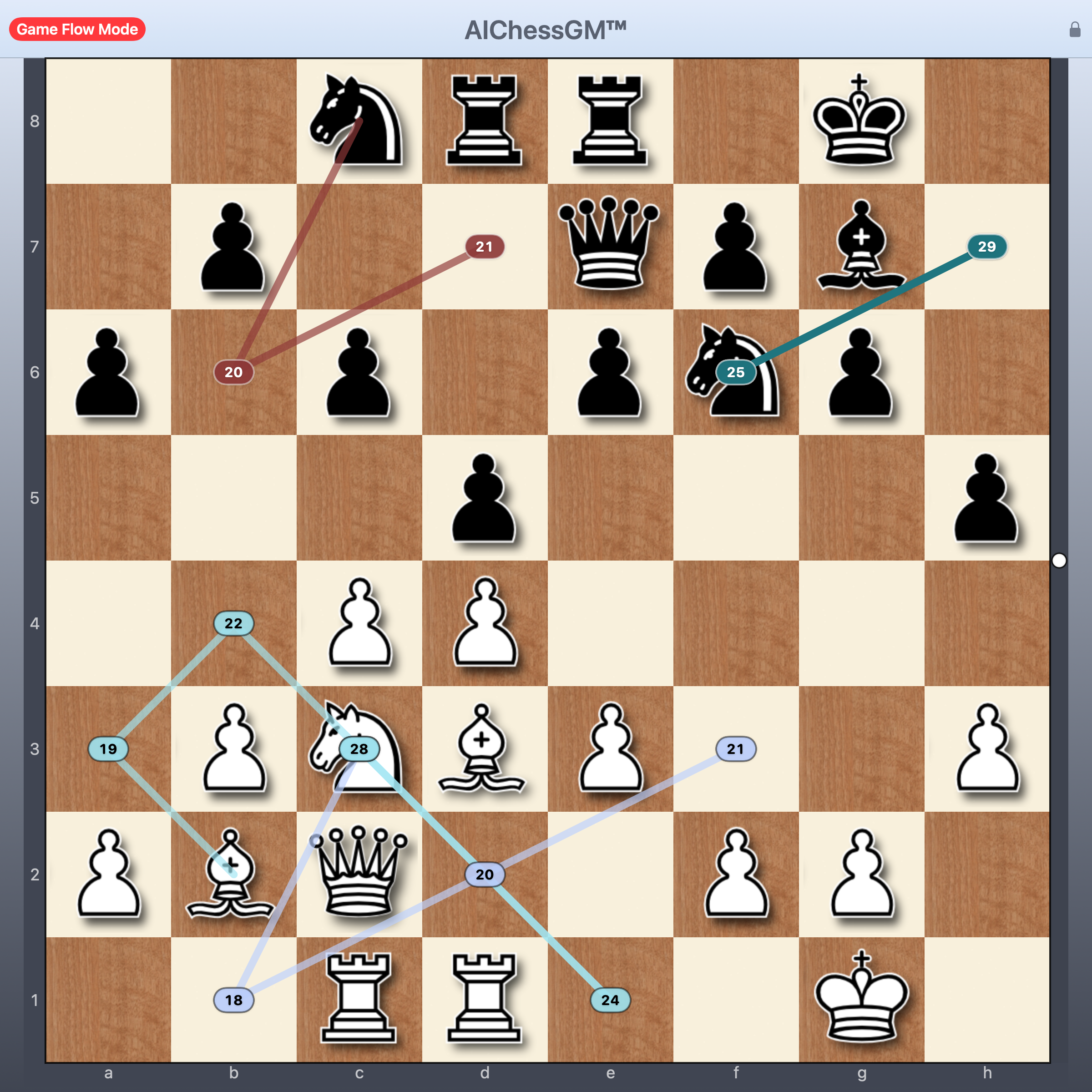
Game Flow Mode in Action

Visualize long-term piece paths and strategic coordination

Game Flow Mode screenshot showing piece path planning and strategic coordination

Game Flow Mode showing path visualization for strategic planning and piece coordination

Use Game Flow Mode to communicate ideas quickly: limit the number of future moves, select only the pieces you care about, and keep the board readable with clutter opacity controls.

System Requirements

AIChessGM is designed to work on modern macOS systems

πŸ’»

Operating System

macOS 14 (Sonoma) or later

⚑

Architecture

Apple Silicon (M-series) only

πŸ”§

Optional

UCI Chess Engines (Stockfish)
OpenAI API Key (for AI features)

πŸ“

Supported Formats

PGN, .cgmdb, .bin, .ctg, .otb, FEN

AIChessGM 1.000 Β· Start Your Free Trial

AIChessGM 1.000 is available now. The one-time $100 USD 1.x license includes all 1.x updates and activation on up to two Macs for one person. New eligible installations receive a 30-day trial.

Version 1.005 β€’ September 2026

macOS 14+ β€’ Apple Silicon

Download DMG File

View Changelog

Privacy: AI features are optional and disabled by default. Provider credentials stay in local app preferences on your Mac; content is sent only when you use a configured cloud feature. Read the privacy policy.

Website operations: Download links may use server-side counting for release statistics. Optional newsletter signup is separate from the app.

Support: Existing customers can email support@aichessgm.com. General and pre-sales questions can go to info@aichessgm.com.

Commercial terms: Review the license FAQ, 30-day refund policy, and license agreement. Purchase is handled by Lemon Squeezy through its secure hosted checkout.

Existing preview users keep their displayed trial expiry, including September 20, 2026 where applicable. Installing the commercial update preserves the expiry already shown to existing testers; it does not restart their trial. A paid activation preserves full access after that expiry. Without activation, Restricted mode keeps local files available to open, view, and export; editing, analysis, AI, and training require a license. See how to purchase and enter your license key.

Trial and support: Check Settings β†’ License for your trial expiry. New eligible installations receive a 30-day trial; existing preview users retain their displayed expiry. For questions or bug reports, email support@aichessgm.com.

Guides and Remote Leela Setup

Read the main AIChessGM user guide, open the dedicated Repertoire Builder guide, or use the optional remote Leela setup guides.

Optional: This remote-engine package is not required to install or run AIChessGM itself. AIChessGM works on its own without any Vast.ai, Tailscale, or Leela server setup.

Bridge source included: The setup package now includes the Go source for the Leela communication/startup layer, so you can build the bridge for Windows, macOS, or Linux. The bundled prebuilt bridge binary is Linux x86_64 only.

Fresh Vast container recovery: The packaged Vast bootstrap now auto-installs tailscale when the base Jupyter image is missing it, so a persistent /workspace volume can restore the service on the next start with much less manual recovery.

Download Setup + Source ZIP